
An open-source replacement for Microsoft Money
MoneyMatter reads Microsoft Money .mny files directly, including password-protected ones. Your accounts, categories, payees, splits and transfers come across. Try the cloud free for 40 days with no card, or host it yourself for free.
- Microsoft Money files, read directly
- .mny
- Open source
- AGPL-3.0
- Cloud, from
- $30/yr
- Self-hosted
- $0
What you get with MoneyMatter
Open code, backups and export
- Open source
- The code is public under AGPL-3.0. If the cloud service ever closed, you could keep running the app on your own server.
- Backup and restore
- Download a full backup of your account and restore it on the cloud or on your own server. On the cloud, restoring needs a paid plan.
- Export
- CSV or Excel on every plan. It keeps working after a trial or a plan ends.
Bank data, now that Money no longer downloads it
- Bank sync
- On the Plus plan, through LunchFlow, SimpleFIN, Monobank and Walutomat. LunchFlow and SimpleFIN are separate paid services with their own account. Sync is read-only.
- OFX and QFX files
- Import the statement files your bank lets you download, on every plan. Overlapping statements are matched by transaction ID.
- CSV and PDF statements
- A CSV importer with column mapping, and AI parsing for PDF statements.
Portfolios, loans and net worth
- Portfolios
- Holdings in stocks, ETFs and crypto, with cost basis, returns and dividends.
- Loans
- Mortgage, auto, student and personal loans with a projected payoff date, the interest still to pay, and what an overpayment changes.
- Net worth
- Cash, investments, vehicles, venture deals and loans on one chart.
Multi-currency
- About 158 currencies
- Exchange rates are fetched automatically.
- Historic rates
- Each transaction is converted at the rate of its own date.
Reports to set up again
- Not imported
- Reports and budgets saved in your Money file are not read, so you set them up again here.
- By category or payee
- Pivot tables total your imported history by category, payee or tag, per week, month, quarter or year.
- Income and spending
- A cash flow report by month, and a diagram of where each income source went.
See what is planned on the public roadmap, read the code on GitHub, or see how self-hosting works.
Microsoft Money and MoneyMatter side by side
Status
Microsoft MoneyDiscontinued. Microsoft stopped selling it on 30 June 2009 and ended online services and assisted support on 31 January 2011
MoneyMatterActively developed. Every release is listed on GitHub
What you can still run
Microsoft MoneyMoney Plus Sunset, which Microsoft calls a replacement for expired versions of Money. It needs no activation, and opens and converts Money Plus files and files from older US versions of Money
MoneyMatterThe current version, on the cloud or on your own server
Where it runs
Microsoft MoneyA desktop program for Windows. Microsoft listed Windows 7, Windows Vista and Windows XP as supported. Community answers on Microsoft Q&A report it running on Windows 10 and 11
MoneyMatterA web app in your browser, with a phone layout you can add to your home screen. No desktop app, no native iOS or Android app, and no offline mode
Bank downloads
Microsoft MoneyNo online services in Money Plus Sunset: no online quotes, bill payment or statement downloads started by Money. OFX and QIF statements downloaded from your bank still import
MoneyMatterBank sync on the Plus plan. OFX, QFX and CSV file imports on every plan
Your data
Microsoft MoneyA Money data file that you open and edit in the program
MoneyMatterKept on the MoneyMatter cloud or on your own server, not in a file on your PC
Price
Microsoft MoneyMoney Plus Sunset was a download from Microsoft with no activation step. Its download page names no price
MoneyMatterA yearly cloud plan: $30 for Essential or $55 for Plus, after 40 days of trial with no card. Self-hosting costs nothing
Support
Microsoft MoneyNo assisted support from Microsoft since 31 January 2011
MoneyMatterEmail support, and a public roadmap you can vote on
Budgets
Microsoft MoneyA Budget Planner with a budget for each category and a cash-flow forecast
MoneyMatterA spending limit over a date range you choose, for categories you pick or transactions you attach. No balance forecast and no repeating monthly budgets. Budgets in a .mny file are not imported
Bills and recurring payments
Microsoft MoneyRecurring Bills & Deposits with reminders
MoneyMatterSubscriptions, bills and installments on a weekly to yearly schedule, with reminders in the app and by email. Recurring payments can be detected from your history. Bills in a .mny file are not imported
Investments
Microsoft MoneyA Portfolio Manager for stocks, funds, bonds and employee stock options, with cost-basis lots and capital-gains reports. Online quotes ended in January 2011, so prices in Money Plus Sunset are typed in by hand
MoneyMatterStocks, ETFs and crypto, with stock and ETF prices updated once a day and crypto hourly. The cost basis of a holding is its average cost. You cannot view lots or choose which lot a sale uses. Realized and unrealized return is shown per holding. No capital-gains report. No bonds, mutual funds or options. Investment accounts in a .mny file are not imported
Loans
Microsoft MoneyLoan and mortgage accounts with an amortization schedule that splits each payment into principal and interest, plus a Debt Reduction Planner
MoneyMatterMortgage, auto, student and personal loans with a projected payoff date, the interest still to pay, and what an overpayment changes. A month-by-month balance projection on a chart. No amortization table, and no principal and interest split per payment. Interest paid so far is an estimate. No planner across several debts. Loan accounts in a .mny file are not imported
Currencies
Microsoft MoneyAccounts in different currencies in one file. Exchange rates are entered by hand now that online updates have ended
MoneyMatterAbout 158 fiat currencies, each account in its own. Exchange rates are fetched automatically, and you can set your own rate for a currency
Reports
Microsoft MoneyA large set of built-in reports and charts that can be customised and saved as favourites, including tax reports aimed at US filers
MoneyMatterCash flow, money flow, net worth history, and pivot tables by category, payee or tag, per week, month, quarter or year, with saved pivot views. No free-form report builder and no tax reports. Reports saved in a .mny file are not imported
Long-term planning
Microsoft MoneyA Lifetime Planner for retirement and long-term goals, in Deluxe and higher
MoneyMatterA FIRE planner on the Plus plan. It projects the month your savings could cover your spending. No savings goals and no plan built from separate life events
Sharing with a partner
Microsoft MoneyOne local file that can be password-protected. No separate logins or roles for a second person
MoneyMatterEach person signs in to their own account. You invite them by email with read-only or write access, set per account or budget. 2 seats on Essential, 5 on Plus, and each person needs their own trial or plan to make changes
Rows from Status to Support were checked on 12 October 2026 against the sources at the end of this page. Rows from Budgets down describe Money Plus Deluxe and Premium, the 2008 versions that Money Plus Sunset replaces, from our own knowledge of the program, and are not checked against a linked source. MoneyMatter plans are on the pricing section.
Move your Microsoft Money history
The Microsoft Money import guide covers every option.
- 1
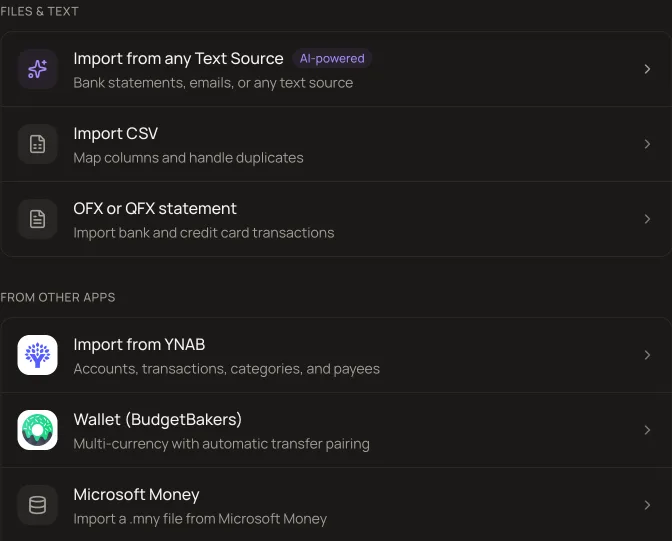
In MoneyMatter, open Settings, then Import/Export. Under From other apps, pick Microsoft Money.
- 2
Select your .mny file. If you protected it with a password in Microsoft Money, enter it. Click Continue.
- 3
On Map data, choose what happens to each account: create a new one, link it to an account you already have in the same currency, or skip it. Then map the categories.
- 4
On Review, check what was left out and any possible duplicates. If the file has voided transactions, tick the box to import them too.
- 5
Click Import. The import runs in the background and ends with a summary of what was created, skipped or failed.
What comes across
- Banking, credit card, cash, asset and liability accounts.
- Transactions with their category, payee and memo. A transaction with no memo keeps its cheque number as the note.
- Categories, including the two levels Money uses, mapped to yours or created during the import.
- Split transactions. Each line of a split becomes its own transaction, and the parent row is dropped so nothing is counted twice.
- Transfers between two imported accounts, once each. Money links both sides in the file, so no guessing by date or amount is involved.
- Voided transactions, if you tick the box: at an amount of zero, tagged "Void", with the original amount kept in the note.
- Password-protected files, and files up to 50 MB with up to 100,000 transactions.
Limits of the import
- Investment and loan accounts are skipped, with a warning. Set them up by hand as portfolios and loans.
- A transfer to an account that is not imported comes in as money moved outside the accounts you track.
- An account with no currency in the file is treated as USD, with a warning. The importer cannot change this, so skip the account if it is not in USD.
- Budgets, bills and reports are not read from the file. The importer brings accounts, transactions, transfers, categories and payees.
- Transactions beyond 100,000 are dropped, and rows with an unreadable date or amount are skipped. Both are reported.
- The duplicate check runs only for accounts you link to existing ones. Transfers are never checked.
- If you skip an account, its transfers are dropped too, so the account on the other side may not match its Microsoft Money balance.
- The upload expires after 30 minutes without activity, or 4 hours in total. Then you upload the file again.
Cloud or your own server: what differs
The self-hosted app is the same app with every feature on, and it stays free. The cloud is for people who would rather not run a server.
- Hosting
- Self-hosting needs a server with Docker Compose and at least 2 GB of RAM. On the cloud, hosting, updates and security patches are done for you.
- Backups
- A self-hosted install is backed up with pg_dump plus the attachments volume, and that is your job.
- Price feeds
- Stock and crypto prices, exchange rates and merchant logos are included. Self-hosted crypto prices and merchant logos need your own keys.
- Trial
- 40 days with every cloud feature, no card needed. Paid plans start from $30/year.
Questions about switching
Do I have to export anything from Microsoft Money first?
No. You upload the .mny file itself and MoneyMatter reads it. There is no QIF or CSV export step, and Microsoft Money does not need to be installed on the computer you upload from.
Can MoneyMatter open a password-protected .mny file?
Yes. Enter the file password next to the file when you upload it. For a file written by Money 2002 or later, a missing or wrong password stops the import and asks for it, and nothing is imported until the file opens. Files written before Money 2002 open without the password.
Which Microsoft Money versions does it work with?
The importer is tested with sample files from Money 2001, 2002, 2004, 2005, 2008 and Money Plus Sunset. Files written by Money 2001 and 2002 come across without payees. If your file is laid out differently, the review step names what could not be read.
Are my investment and loan accounts imported?
No. They are skipped with a warning, and transfers to them arrive as money moved outside the accounts you track. MoneyMatter has portfolios and loans, but you set those up yourself.
Is my .mny file kept after the import?
No. MoneyMatter does not keep the uploaded file, only what it read from it, and that expires after 30 minutes without activity or 4 hours in total. The file on your computer is not changed, and an import can be undone from Import History.
When Microsoft Money is the better fit
- You want a Windows desktop program that works with no internet connection. MoneyMatter is a web app and has no offline mode.
- You do not want an online account or a server to look after. MoneyMatter is either a cloud account or a Docker install you run.
- Most of your history is in investment or loan accounts. The import skips them, so you would re-enter that part by hand.
- You hold bonds, mutual funds or employee stock options, or you rely on cost-basis lots, capital-gains reports or tax reports. MoneyMatter tracks stocks, ETFs and crypto, shows the cost basis of a holding as its average cost with no view of lots, and has no capital-gains or tax reports.
- You use the loan amortization schedule or the Lifetime Planner. MoneyMatter projects a loan balance on a chart but has no amortization table and no principal and interest split per payment, and its only long-term planner is the FIRE planner on the Plus plan.
- Money Plus Sunset still does everything you need, and typing in or importing statements yourself is fine by you.
- You want another Windows desktop program that reads your Money data. Quicken says Quicken for Windows imports data from Microsoft Money 2008 and 2009, Deluxe and higher.
- You want to pay once instead of every year. Moneyspire sells its licence as a one-time purchase and calls it perpetual. Its bank sync, cloud sync and quote downloads are included for one year.
Other comparisons: Wallet by BudgetBakers, YNAB, Monarch Money. All of them are on one page.
Microsoft and Microsoft Money are trademarks of the Microsoft group of companies; MoneyMatter is not affiliated with Microsoft.
Sources, checked on 12 October 2026
- Microsoft: Microsoft Money Plus 'Sunset' Versions (archived 25 June 2011)
- Microsoft Support KB 2118008: What Is Microsoft Money Plus Sunset? (archived 24 December 2011)
- Microsoft Download Center: Money Plus Sunset Deluxe (archived 2 January 2012)
- Microsoft Q&A: How can I download MS Money now? (community answer)
- Microsoft Q&A: Is Microsoft Money still available in 2024? (community answer)
- Quicken: How do I import data into Quicken for Windows?
- Moneyspire: Buy Moneyspire
- Sunriise sample .mny files