
An open-source alternative to Wallet by BudgetBakers
MoneyMatter is an open-source personal finance tracker with AI categorization, pivot reports, and tracking for loans, vehicles and venture deals. It has an importer built for Wallet exports, so your records, labels and transfers come with you.
- Open source
- AGPL-3.0
- Cloud, from
- $30/yr
- Self-hosted
- $0
- Tools for your AI assistant
- 100+
What you get with MoneyMatter
AI that does the sorting
- Auto-categorization
- AI categorizes new transactions after every bank sync and import, and follows instructions you write for it.
- Statement parsing
- Upload a bank statement as PDF, CSV or text and AI turns it into transactions. Password-protected PDFs work too.
- Your own model
- Use Anthropic, OpenAI, Google or any OpenAI-compatible endpoint, on every plan.
- MCP server
- Connect Claude or ChatGPT with 100+ tools and three access levels: read, write, or write and delete.
Reports that answer questions
- Pivot tables
- Slice by category, payee or tag across weeks, months, quarters or years, and save the views you reuse.
- Cash flow
- Income against expenses, with a money-flow diagram from each income source to each category.
- Trends comparison
- This period against the previous one, category by category.
- FIRE planner
- Built on your real spending and savings rate. On the Plus plan.
Your whole net worth
- Loans
- A payoff projection, and what an overpayment changes.
- Vehicles
- Value drops on a depreciation schedule you can override.
- Venture deals
- Capital calls, distributions, TVPI, DPI and IRR for angel and SPV investments.
- Portfolios
- Stocks, ETFs and crypto with cost basis and returns.
Tools to keep the books clean
- Refunds
- Link a refund to its purchase, so spending goes down and income stays honest.
- Splits and groups
- Split one transaction across categories, including bank-synced ones, and bundle related ones into a group.
- Automations
- Rules with ten kinds of conditions. Preview a rule, then apply it to past transactions.
- Transfer matching
- Turn two existing transactions into a transfer, with suggestions for likely pairs.
- Reconciliation
- One page for duplicate, unwanted and stuck pending bank transactions.
- Categories
- Three levels deep. Create, rename and move them at any level.
Built in the open
- Public roadmap
- Vote on what gets built next.
- Frequent releases
- 21 shipped in September 2026, each one listed on GitHub.
- Self-hosting
- Free with Docker, with every feature on.
Your data stays yours
- Backup and restore
- Download a full backup of your account and restore it later, on the cloud or on your own server.
- Export, always
- On every plan, and still there after a trial or plan ends.
- Published price
- $30 or $55 a year, before tax. It is on the website.
See what is planned on the public roadmap, read the code on GitHub, or see how self-hosting works.
Wallet and MoneyMatter side by side
Source code and hosting
WalletNot published. Cloud only
MoneyMatterOpen source. Use the cloud or self-host for free
Price
WalletNot listed on the website. Shown in the app, and it differs by country and app store
MoneyMatter$30 a year for Essential, $55 a year for Plus, after a 40-day trial without a card
Getting your data out
WalletCSV and XLS export of transactions, on Premium
MoneyMatterExport on every plan, plus a full account backup you can restore
Refunds
WalletRecorded as separate income
MoneyMatterLinked to the original purchase
AI
WalletAutomatic categorization, receipt scanning, and an MCP server for your own assistant
MoneyMatterCategorization, statement parsing, an MCP server, and your own model inside the app
Beyond bank accounts
WalletStocks, ETFs and crypto. Simple debts you lent or borrowed
MoneyMatterStocks, ETFs and crypto. Loans with payoff projections, vehicles and venture deals
Bank sync
WalletPremium. Wallet says it connects to over 15,000 institutions
MoneyMatterPlus plan, through LunchFlow, SimpleFIN, Monobank and Walutomat. LunchFlow and SimpleFIN need their own account
Apps
WalletiOS, Android and web, with offline mode on mobile
MoneyMatterWeb app built for phones too; add it to your home screen. No native apps, no offline mode
Free use
WalletFree plan for manual tracking
MoneyMatterFree when self-hosted. On the cloud, the trial is followed by a paid plan
Wallet details checked on 9 October 2026 against the sources at the end of this page. MoneyMatter plans are on the pricing section.
Move your Wallet history
The import takes a few minutes. The Wallet import guide covers every option.
- 1
Set Wallet's language to English or Spanish, then export your records as CSV. On the web app, select the records and choose Export. The iOS app has no export.
- 2
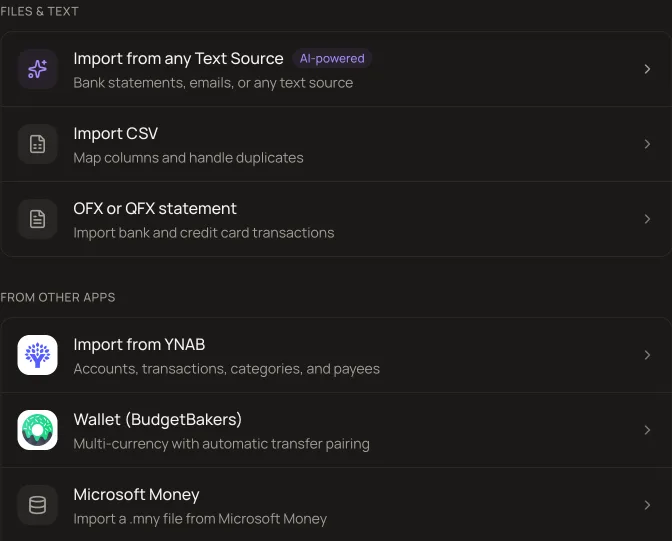
In MoneyMatter, open Settings, then Import/Export, and pick Wallet (BudgetBakers). Upload the file, or several files at once.
- 3
For each Wallet account, create a new account, link it to one you already have, or skip it.
- 4
Map each Wallet category to one of yours, or create it during the import.
- 5
Review the possible duplicates and confirm.
What comes across
- Every record, with its category and payee.
- Labels, as tags. A record with several labels gets several tags.
- Transfers between your Wallet accounts, joined back into one transfer each.
- Several export files in one go, up to about 10 MB and 100,000 rows together.
Limits of the import
- The Wallet export must be in English or Spanish. Other languages stop the import.
- Budgets, planned payments and goals are not imported.
- Duplicates are checked only in accounts you link to existing ones, and joined transfers are not checked.
- Skipping an account also drops every transfer to or from it, so balances can differ from Wallet.
Two records are joined into one transfer when they share a date and time, sit in different accounts, and their amounts are within 1% of each other. See how transfers work.
Questions about switching
Do I need Wallet Premium to move my data?
Yes, for the export. Wallet's CSV export is a Premium feature, and MoneyMatter imports that CSV file. If you are on the free plan, you would need Premium for long enough to export.
Are my budgets and planned payments imported?
No. The importer brings in records, categories, payees, labels and transfers. Budgets and recurring payments are set up again in MoneyMatter.
What happens to transfers between my accounts?
Wallet stores a transfer as two records. MoneyMatter joins them into one transfer when both have the same date and time, sit in different accounts, and their amounts are within 1% of each other. A transfer record with no partner comes in as money moved outside the accounts you track.
Can I check the result before anything is saved?
Yes. You map each Wallet account and category first, then a review step lists possible duplicates. Nothing is written until you confirm.
Is there a MoneyMatter mobile app?
Not a native one. MoneyMatter is a web app with a phone layout, and you can add it to your home screen. It needs a connection to work.
When Wallet is the better fit
- You want a native phone app that works offline.
- You only track by hand and the free plan covers it.
- You export Wallet in a language other than English or Spanish. MoneyMatter cannot read those files yet.
Sources
Checked on 9 October 2026. Wallet and BudgetBakers are trademarks of BudgetBakers; MoneyMatter is not affiliated with them.