
An open-source alternative to Monarch Money
MoneyMatter is an open-source personal finance tracker. Try the cloud free for 40 days with no card, or host it yourself for free. It keeps every account in its own currency and is not limited to the US and Canada. You import Monarch's CSV export with the general CSV importer.
- Cloud trial, no card
- 40 days
- Open source
- AGPL-3.0
- Self-hosted
- $0
- How you import from Monarch
- CSV
What you get with MoneyMatter
More than one currency, not limited to the US and Canada
- Accounts
- Each account keeps its own currency. You can keep a USD checking account, a CAD savings account and a EUR card in one profile.
- Totals
- Balances, the dashboard and reports are converted into a base currency you choose. Exchange rates update automatically, and you can set your own rate for any currency.
- Securities
- Stocks, ETFs and crypto are holdings you record yourself. Price lookup works for US listings and for many European ones, including UCITS ETFs; coverage of a given exchange is not guaranteed. Each security keeps its own trading currency.
Open code and your own server
- Licence
- The code is public under AGPL-3.0.
- Self-hosting
- Run it with Docker on your own server for free, with every feature included. Your data stays on that server.
- Backups
- Export a backup on the cloud and restore it on your own server, or the other way round.
Trial and price
- Trial
- 40 days with no card on file, so nothing can be charged when it ends.
- After the trial
- Without a subscription the account turns read-only. You can still sign in, view and export your data. Nothing is deleted.
- Plans
- Essential is $30 a year or $5 a month. Plus is $55 a year or $8 a month. Prices are in USD, before tax.
Bank data and AI assistants
- Bank sync
- On the Plus plan, through LunchFlow, SimpleFIN, Monobank or Walutomat. LunchFlow and SimpleFIN are separate paid services with their own account.
- Files
- CSV, OFX and QFX imports on every plan, for banks you do not connect.
- MCP server
- Built in, on every plan and in the trial. You approve read access, write access, or write and delete.
- AI features
- On Essential they run on your own API key. On Plus they can run on ours, with a fair-use cap.
See what is planned on the public roadmap, read the code on GitHub, or see how self-hosting works.
Monarch and MoneyMatter side by side
Price
MonarchCore is $14.99 a month or $99.99 a year. Plus is $199.99 a year, billed annually. In USD, plus tax where it applies
MoneyMatterEssential is $5 a month or $30 a year. Plus is $8 a month or $55 a year. In USD, before tax
Free trial
Monarch7 days. A payment method is required, and you are billed when the trial ends unless you cancel at least 24 hours before
MoneyMatter40 days, no card. If you do not subscribe, the account turns read-only and nothing is charged
Free option
MonarchNone. Monarch offers paid subscriptions only
MoneyMatterSelf-hosting is free. There is no free cloud plan
Countries and currencies
MonarchAvailable in the US and Canada only. Every amount is shown with a $ sign and nothing is converted, so 10,000 CAD plus 10,000 USD shows as $20,000
MoneyMatterEach account has its own currency. Totals are converted into the base currency you choose
Bank sync
MonarchIncluded in Core and Plus. 13,000+ institutions through Plaid, Finicity and MX
MoneyMatterOn the Plus plan, through LunchFlow, SimpleFIN, Monobank or Walutomat. LunchFlow and SimpleFIN charge separately
Investments
MonarchHoldings from connected accounts or added by hand. Prices only for securities on US exchanges, shown in USD
MoneyMatterHoldings you record yourself. Price lookup works for US listings and for many European ones, including UCITS ETFs; coverage of a given exchange is not guaranteed. Prices are in each security's own currency
File import
MonarchCSV, on the web only. A CSV import cannot be undone
MoneyMatterCSV, OFX and QFX, plus importers for YNAB, Wallet and Microsoft Money. A CSV import can be deleted from Import History
Getting your data out
MonarchCSV of transactions and account balances. It works after a subscription or trial ends
MoneyMatterData export on every plan, and in read-only mode after a trial or plan ends. Plus a backup you can restore
AI assistants
MonarchAn official MCP connector. Its help page, read on 12 October 2026, says it is temporarily paused
MoneyMatterA built-in MCP server on every plan, with read, write, or write and delete access
Apps
MonarchWeb, iPhone, iPad and Android
MoneyMatterA web app that runs in the browser on a computer or a phone. No native apps
Sharing
MonarchHousehold members join one subscription at no extra cost. Accounts and transactions cannot be hidden from them
MoneyMatter2 household seats on Essential, 5 on Plus. Each member needs their own trial or plan to make changes
Refunds
MonarchA refund for the remaining time on the subscription. Apple App Store subscriptions are not eligible
MoneyMatterA full refund within 14 days of the first payment
Monarch details checked on 12 October 2026 against the sources at the end of this page. MoneyMatter plans are on the pricing section.
Move your Monarch history
MoneyMatter has no dedicated Monarch importer. Monarch exports your transactions as a CSV file, and MoneyMatter imports CSV files with column mapping. This route has not been tested with a real Monarch export, so check each step against your own file. The CSV import guide covers every option.
- 1
In Monarch, open Settings, then Data, and select Download Transactions. You get one CSV file with the transactions of all your accounts. Monarch says this download keeps working after a subscription or trial ends.
- 2
In MoneyMatter, open Settings, then Import/Export, and click Import CSV. Drop the file and continue to the mapping.
- 3
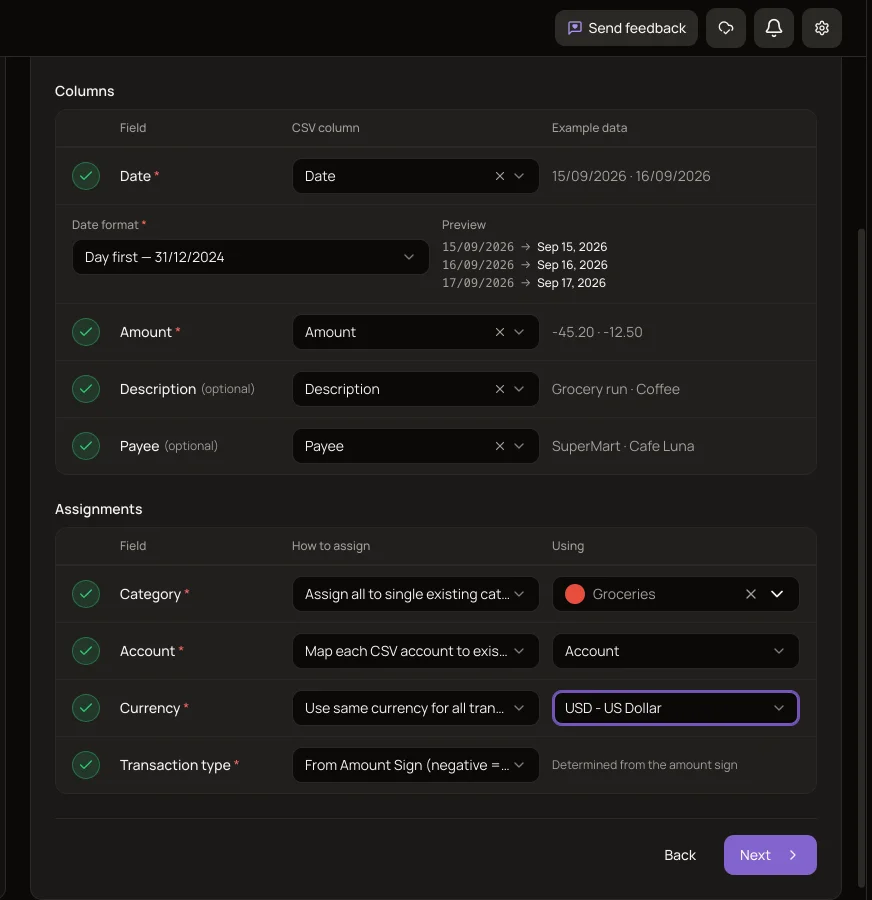
On Map Columns, pick the date column and the amount column. If your file has a merchant or payee column, map it to Payee; map one notes or description column to Description. If the dates are not written year-first, choose day-first or month-first.
- 4
Under Assignments, if the file has category and account columns, take Category and Account from them. Pick one currency for the whole file. Keep Transaction type on From Amount Sign if your file writes spending as negative amounts.
- 5
On Accounts, link each account name to an account you already have, create it, or skip it. For a new account, enter what it holds today and MoneyMatter works out the starting balance. On Categories, link each name to a category of yours or create it.
- 6
On Review, check the invalid rows and the possible duplicates. Nothing is saved before you start the import.
What comes across
- The date, the amount, and whether each row is income or an expense.
- A payee, if you map a column to it. A payee you already have under the same name is reused.
- One text column, as the transaction note.
- Categories, linked to yours or created. AI can suggest the closest existing category on Plus, in the trial, or with your own API key.
- Accounts, each one linked, created or skipped. A new account ends at the current balance you enter.
- Up to about 10 MB and 50,000 rows in one import. Several files are combined when they have exactly the same header row.
- An undo. Delete the whole import from Import History, as long as its accounts have not been connected to a bank since.
Limits of the import
- This is the general CSV import, not a Monarch importer.
- One currency for the whole file. Monarch does not tell currencies apart, so if you have both USD and CAD accounts, import each currency as its own file.
- A transfer between two accounts arrives as two separate transactions, an expense and an income. Link the pairs afterwards with Transfer matching.
- A tags column or an ID column has no field to map to. The importer reads a date, an amount, a description, a payee, a category, an account, a currency and a type.
- There is one Description field, so only one text column of the file becomes the transaction note.
- New categories are created at the top level. Monarch's category groups are not rebuilt.
- Only transactions are imported. Budgets, goals, rules and investment holdings have to be set up again, and Monarch's balance history file has no importer.
- Duplicates are checked only against accounts you already have. Rows going into an account the import creates, and repeated rows inside one file, are not checked.
- A comma with no dot is read as a decimal point, so 1,234 would be imported as 1.23. Look at how amounts over 999 are written in your file.
- Dates with month names, such as Jan 5, 2026, are not recognised, and those rows are marked invalid.
After the import, open Transfer matching to join the two sides of each transfer. Until they are linked, a transfer counts once as spending and once as income.
Second route: an AI assistant over MCP
MoneyMatter has a built-in MCP server, included in every plan and in the trial. It works with assistants that support remote MCP servers with OAuth sign-in. The connection guide covers Claude, ChatGPT and Claude Code. You connect the assistant, give it your Monarch CSV, and it creates the records through the server's tools. Monarch's own help page says you can upload your export to an AI model of your choice.
- Access level
- Keep "Create and edit your financial data" ticked when you approve the connection. With view access only, the assistant can read and cannot add anything. "Delete your financial data" can stay off.
- Accounts first
- Create your accounts in MoneyMatter before you start. The server has no tool that creates an account.
- What it creates
- Categories and tags, then transactions, each with its account, date, amount, category, tags and note. It can also record a move between two accounts as one linked transfer.
- Speed
- There is no bulk-create tool. Every transaction is its own tool call, so a history of several thousand rows is slow and can stop partway at the assistant's usage or context limits.
- Checking
- An assistant can skip or repeat rows. Compare the count and the account balances with your file when it finishes.
- ChatGPT
- Whether a custom MCP server may change data depends on your ChatGPT plan. Some plans allow reading only.
- Best use
- A short history, or tidying up after the CSV import: linking transfer pairs, adding tags, fixing categories. For a long history the CSV import is the better route.
A self-hosted MoneyMatter runs its own MCP server. Claude and ChatGPT connect from their own servers, so the install has to be reachable from the internet over HTTPS.
Cloud account or your own server
Both run the same app. Self-host if you want your data on your own machine. Use the cloud if you would rather not run a server. The self-hosting guide lists what a server needs.
- Running it
- On the cloud we host the app and ship updates and security patches. On your own server you run the updates.
- Market data
- The cloud plan pays for the feeds behind stock and crypto prices, exchange rates and merchant logos. Self-hosted, crypto prices need your own API key.
- Who holds the data
- Self-hosted, your data stays on your server and we never see it. On the cloud it is stored with us, and bank credentials and AI keys are encrypted with AES-256-GCM.
- Changing your mind
- A backup exported on one can be restored on the other. Backup export works during the cloud trial. Restoring onto the cloud needs a paid plan.
Questions about switching
Does MoneyMatter have a Monarch importer?
No. There are dedicated importers for YNAB, Wallet by BudgetBakers and Microsoft Money, and none for Monarch. Monarch exports transactions as a CSV file, and MoneyMatter imports CSV files with column mapping, so that is the route. It has not been tested with a real Monarch export.
Is bank sync included, as it is in Monarch?
Not in every plan. Monarch includes bank sync in Core and Plus. In MoneyMatter it is part of the Plus plan and runs through a provider: LunchFlow, SimpleFIN, Monobank or Walutomat. LunchFlow and SimpleFIN are separate services that charge for their own account. Without bank sync you add transactions by hand or import CSV, OFX or QFX files.
Can I use MoneyMatter outside the US and Canada, or with several currencies?
Yes. Each account has its own currency, and totals are converted into a base currency you pick at sign-up, with exchange rates that update automatically. Monarch says it is available only in the US and Canada and does not convert currencies.
Can an AI assistant move my Monarch data for me?
For a short history, yes. Connect an assistant that supports remote MCP servers, such as Claude, ChatGPT or Claude Code, allow it to create and edit data, and give it your CSV. The MCP section above lists the limits. For a long history use the CSV import.
What happens when the 40-day trial ends?
Nothing is charged, because the trial starts without a card. If you do not subscribe, the account turns read-only: you can sign in, view and export your data, or delete the account. Monarch's 7-day trial needs a payment method and bills you when it ends unless you cancel first.
When Monarch is the better fit
- You bank in the US or Canada and want sync included in the price. Monarch connects 13,000+ institutions on both plans. In MoneyMatter, bank sync needs the Plus plan and, for US and Canadian banks, a separate paid LunchFlow or SimpleFIN account.
- You want native apps. Monarch has iPhone, iPad and Android apps, and receipt scanning and Apple Card sync are mobile features. MoneyMatter is a web app with no native apps.
- You budget month by month with rollovers. Monarch has Flex and category budgeting, and a category can carry its surplus or shortfall into the next month. A MoneyMatter budget is a spending limit over a date range, with no rollover and no repeating monthly budgets.
- You share with a whole household. Monarch adds household members to one subscription at no extra cost. MoneyMatter cloud plans have 2 or 5 seats, and each member needs their own trial or plan to make changes.
- You want an AI assistant with nothing to set up on the lower plan. Monarch's AI Assistant is part of Core. On MoneyMatter's Essential plan, AI features need your own API key.
- All your accounts are in US dollars, your securities trade on US exchanges, and Monarch's price is fine with you. In that case MoneyMatter adds open code and self-hosting.
Other comparisons: Wallet by BudgetBakers, YNAB, Microsoft Money. All of them are on one page.
Monarch and Monarch Money are trademarks of their owner; MoneyMatter is not affiliated with it.
Sources, checked on 12 October 2026
- Monarch pricing
- Monarch download
- Monarch help: FAQs
- Monarch help: pricing
- Monarch help: money-back guarantee
- Monarch help: international accounts and currency
- Monarch help: data providers and connections
- Monarch help: investments
- Monarch help: downloading transaction or account history
- Monarch help: importing transactions manually
- Monarch help: MCP connector
- Monarch help: getting started
- Monarch help: creating your budget
- Monarch help: Flex budgeting
- Monarch help: couples and households